• Search form is empty!

  • Showing posts with label Angular. Show all posts
    Showing posts with label Angular. Show all posts

    utilityService

    http://robertdunaway.github.io

    The Mashup is a learning tool that also serves as a bootstrap project for line-of-business applications.

    http://mashupjs.github.io

    The utilityService provides general utility functions to modules.

    Purpose

    Every application needs utility functions. In an effort to modularize the Mashup, general functions that can be reused are placed into utility modules.
    Utility modules begin with “utility_“.

    Two examples of utility modules are:
    - utility_LogHelper.js
    - utility_UtcDateService.js

    An application can easily have 20 or 30 module utilities and a controller might need five or six of them. To reduce dependency injection complexity, all utilities are exposed by the utility module hosted in the utilityService.

    utilityService

    Here is an example of what the utilityService looks like when exposing only two other modules.
    
    /*global mashupApp:false */
    
    mashupApp.service('utility', function (utility_UtcDateService, utility_LogHelper) {
    
        //---------------------------------------------------------------------
        // INSTRUCTIONS for 'utility' usage.
        //---------------------------------------------------------------------
        //---------------------------------------------------------------------
        // Keeps like utility groups together in their own modules then reference 
        // them here and use this general utility class throughout the project.
        // This will allow for more modular, testable, code while keeping the 
        // number of dependency injected modules to minimum.
        //---------------------------------------------------------------------
        //---------------------------------------------------------------------
    
        //---------------------------------------------------------------------
        // Provides access to the utility_UtcDateService functions.
        // For converting to and from local and UTC dates.
        //---------------------------------------------------------------------
        var utcMilToLocalMil = utility_UtcDateService.utcMilToLocalMil;
        var localMilToUtcMil = utility_UtcDateService.localMilToUtcMil;
        var localDateToUtcDate = utility_UtcDateService.localDateToUtcDate;
        var utcDateToLocalDate = utility_UtcDateService.utcDateToLocalDate;
        //---------------------------------------------------------------------
        //---------------------------------------------------------------------
    
    
        var getLogObject = utility_LogHelper.getLogObject;
    
        return {
            //---------------------------------------------------------------------
            // Provides access to the utility_UtcDateService functions.
            // For converting to and from local and UTC dates.
            //---------------------------------------------------------------------
            localDateToUtcDate: localDateToUtcDate,
            utcDateToLocalDate: utcDateToLocalDate,
            localMilToUtcMil: localMilToUtcMil,
            utcMilToLocalMil: utcMilToLocalMil,
            //---------------------------------------------------------------------
            //---------------------------------------------------------------------
    
            getLogObject: getLogObject
        };
    });


    http://robertdunaway.github.io

    Ease the Transition to Angular 2.0

    Significant changes are coming to Angular 2.0. Since the http://ngeurope.org/, I’ve considered how to position my angular applications for Angular 2.0.

    The changes coming are being driven in large part by ES6. Eventually, all frameworks will need to make this transition. Angular is stepping up and getting it done now. So let’s just suck it up and get-er-done.

    Go ahead and bookmark this blog post. Whenever I learn of a change that positions our applications for Angular 2.0, I’ll update this post. This will be a single go-to place for all changes, making the transition as easy as possible.

    Let’s jump right in…

    Learn ES6

    I’ll soon post links here to many tutorials, utilities, and advice on making this transition.

    Use the “controller as” syntax

    With the release of Angular 1.3 the “controller as” syntax was introduced.

    This helps reduce dependence on $scope and positions our controllers to more easily become ES6 classes when we transition to Angular 2.0.

    Use the new ng-router

    Update: Rob Eisenberg left the AngularJS team and is back to working on Durandal.
    Rob Eisenberg, the author of Durandal, is championing a new more advanced router for Angular. His experience with Durandal, and a general survey of the features available in all of today’s popular routers, has driven the requirements for the new router.

    The ng-router is an Angular 2.0 feature but is being back ported to 1.3. Early adoption of this new router means you’ll have one less thing to deal with when Angular 2.0 comes out.

    Besides, it’s got a few freaking cool features in it. Check out the video below. It’s two months old which, in our new world, means it’s ancient and outdated but still a great starting point. I’ll post more tutorials as I learn how to use it.

    https://www.youtube.com/watch?v=h1P_Vh4gSQY
    https://www.npmjs.org/package/angular-new-router

    Use services wherever possible

    The more code we can move out of controllers and into services, the easier the transition to Angular 2.0 will be.

    Full disclosure – I came across this advice on “Adventures in Angular” podcast and while I get “separation of concerns,” I don’t know how it helps with Angular 2.0. I’ll figure this out and update my notes here.

    Lazy loading

    Lazy (eager) loading of modules is planned for Angular 2.0.

    For now, I’ve prepared for this by implementing lazy loading with ocLazyLoad.

    I mention it in this router post but I’ll provide a specific post about lazy loading later.

    http://robertdunawaypro.blogspot.com/2014/10/routeconfig.html

    Drop-in application design

    I have no idea what to call this, so I completely made up that name. The idea is this. With the new angular router you’ll have the ability to modularize your application such that you can drop modules into an application from another application and this is supposed to work.

    http://Mashupjs.githut.io has an implementation like this. I’ll upgrade it to use the features of the new Angular router as soon as I can.

    In closing

    I’m just like everyone else. I’m figuring this stuff out as I go. If you come across something you think might be helpful then post a comment and I’ll add it to this list.

    Thanks…

    Software Architect or Handyman

    Businesses need both but they don’t often realize this. First, let’s define a software architect. Later, I’ll share the qualities that I think make for a good software architect.

    The software architect

    Wikipedia

    http://en.wikipedia.org/wiki/Software_architect
    “Software architect is a computer programmer or computer manager or expert who makes high-level design choices and dictates technical standards, including software coding standards, tools, and platforms.”

    Not so fast, Wikipedia. Agreed, a software architect “is” a programmer but he may not be a manager and need not dictate standards and tools.

    In fact, an architect should have vast understanding of an array of technologies and approaches but might work with the existing technologies. There are many right ways to do things.

    Microsoft

    http://msdn.microsoft.com/en-us/library/ee658098.aspx
    Philippe Kruchten, Grady Booch, Kurt Bittner, and Rich Reitman definition is:
    “Software architecture encompasses the set of significant decisions about the organization of a software system including the selection of the structural elements and their interfaces by which the system is composed; behavior as specified in collaboration among those elements; composition of these structural and behavioral elements into larger subsystems; and an architectural style that guides this organization. Software architecture also involves functionality, usability, resilience, performance, reuse, comprehensibility, economic and technology constraints, tradeoffs and aesthetic concerns.”

    Honestly I got lost by the end of this and have little to no idea what the heck they are saying.

    Martin Fowler

    “The highest-level breakdown of a system into its parts; the decisions that are hard to change; there are multiple architectures in a system; what is architecturally significant can change over a system’s lifetime; and, in the end, architecture boils down to whatever the important stuff is.”

    Clear as mud…

    Now what?

    So I guess all we’ve proved is there can be many opinions about the definition of a software architect.
    And that’s okay.

    So now that we’ve agreed not to agree about the definition of a software architect, let’s just consider my opinion on what it takes to be a software architect and leave the discussion of “what” a software architect is, to people much smarter than me.

    The software handyman

    The reason for this blog is all to often companies hire a handyman to build their house and skip the architect all together.

    This is a problem. Far to many projects fail to be delivered or when delivered fail when under load. All this could be avoided if an architect were involved.

    The same reason you wouldn’t use a handyman to build your house without the blue prints of an architect is the same reason you need a Software Architect for your enterprise applications.

    Any Software Handyman can become an architect with work. It’s something they must desire and dedicate years toward. Not every Software Handyman wants to. Maybe are happy to support existing applications and write code for new applications according to a specification. We need these guys. They are the unsung heroes of IT.

    What it takes…

    So, maybe I can’t give you one definition of an architect. Generalized terms and descriptions offer little to the concrete world we programmers live in.

    So, dispensing with the BS titles and ego boosting descriptions I’ll simply say what I think an architect must be.

    Be experienced

    Sounds obvious right. Well it’s not. A programmer supporting an application for 15 years might be experienced but is not Software Architect material based on that experience alone.

    A Software Architect must be experienced in a variety of environments with many technologies accompanied with both successes and failures. A diversity of solutions might include client-server, n-tier, distributed computing, and enterprise application integration (EAI) solutions. Failure experiences are as important as successful experiences.

    Anyone who does anything significant is going to have failure. I wouldn’t trust anyone who didn’t.

    Know surrounding practices

    Surrounding practices are all those “things” that bump up against software architecture but are not specifically architectural tasks.

    Examples include project management, process methodologies, networking, and testing. If we had a brainstorming session we could easily come up with a dozen more.

    Be a communicator

    The only thing worse than having no architect is having an Architect who cannot communicate or is a curmudgeon. Instead of not having an architect which leaves room for improvement you have someone in place nobody wants to follow and who could be difficult to remove.

    Like the Project Manager an Architect must be able to communicate ideas and listen to his programmers. As much can be learned from other programmers as personal research.

    I’ve seen grouchy old men who can’t keep up with the young wiper snappers and it’s imply uninspiring. Don’t be a curmudgeon! Programming is supposed to be fun. Don’t beat your programmers up with “Standards”, encourage them with “Guidelines”.

    Study, study, study

    An architect shouldn’t have to study anymore. Right? I wish!

    At the rate of change technology is taking the architect job is no longer as easy as it once might have been. Today an architect must be a perpetual student, always learning, and always testing out new approaches and techniques.

    Whatever technology you are using today is outdated in two years. When reading technology specific blogs and listening podcasts I check the dates. I skip anything over 6 months old and anything over 3 months old I view with skepticism.

    The Architect job is a hard hard job and if you don’t want to do the work then that’s OK. Don’t take the job.

    I imagine this is the one topic that will piss other architects off the most. We like to feel like we have arrived and all we need to do now is attend meetings, give our blessing and deliver edicts. How nice that would be.

    Nope, we have to work our tukisses off more than anyone else because not only must we understand the technology but we must be able to place it into an enterprise context and teach it. When teaching we must know the technology many times more than if we simply wanted to use it.

    Be a coder

    Yep, not only should an architect have written several man years of code he’d better still be writing code.

    As stated earlier, technology is changing at a rapid pace. An architect who is not writing code is quickly outdated and will have his lunch eaten by the next young programmer who “is” excited about technology. He won’t have the experience an architect should have but he will be able to code circles around a non-coding architect.

    So pick a project, select a set of project requirements, humble yourself if needed, and get coding. It’s the only way to stay in this game.

    Read/write articles, blogs, podcasts… oh my!

    There is so much information published every day the even focusing on a narrow subject you can not hope to read everything available or even keep up.

    It doesn’t matter. Today’s good architect reads every article and blog he can, has a list of podcasts. When enough time isn’t available cherry picking the most important podcasts is necessary.

    Subscribing to news letters is an excellent way to stay on top of the best articles without having to search for them. When you discover a programmer author you respect then find his home page, contribute comments to his articles because this will make you a more critical thinker and you’ll, in time become a thought leader.

    You should probably blog once a week because that forces you to continue learning and share what you have learned with the rest of us.

    Be a teacher, mentor, thought leader, and be opinionated

    This is the fruit of your labor which will multiple when it comes into contact with other programmers and applications.

    Be a teacher to all and a mentor to those you see potential in. Chances are someone was a mentor to you. You could change a life. In this industry we do change lives.

    Be an opinionated thought leader. We can never know it all and if we try to know something we risk being wrong. There is nothing more uninspiring than an architect who never has a solid opinion and even less inspiring is an architect who never changes or updates his opinion.

    So be a though leader and come to some conclusions. When more information is available change those conclusions. Don’t keep it a secret out of fear someone might think you are wrong. Share it and have a bit of confidence.

    If you aren’t making mistakes then you aren’t doing anything.

    Feedback welcome

    Being opinionated means I will sometimes be wrong but I’ve given myself the opportunity to get a few things right. I’m bothered by my “handyman” metaphor because it doesn’t give the deserved credit to the everyday coder. I might completely change that.

    If you have feedback, I’m open to learning. You can leave a comment or just email me. I’m not looking to build some large readership base and boost my ego. I simply want to be better tomorrow than I am today.

    Thank you. Bob

    routeConfig.js


    http://robertdunaway.github.io

    The Mashup is a learning tool that also serves as a bootstrap project for line-of-business applications.

    https://github.com/MashupJS/MashupJS

    The routeConfig.js file holds routing information for the Mashup.

    Multiple files implementation

    There is one routeConfig.js file per application. This offers a little independence to the developer and application if it is deployed as a mobile application.

    Additionally, for large applications, separating route configurations makes it easy to exclude routes the user doesn’t need, reducing the number of routes the system must interrogate between state changes.
    Applications are defined by each directory in the core/apps directory. 
    Examples:
    App1 - root/core/apps/app1
    App2 - root/core/apps/app2
    Mashup - root/core/apps/mashup

    root/config/rootConfig.js

    This is the initial route configuration file that is always loaded. It contains the default route “/” and more importantly the code for starting up the session.

    The loadCompleted() function is run by every route requiring an authenticated user. It gets user information and puts it into the sessionService, then logs the route for instrumentation and analysis.
    The “getUserInfo()” function may vary from application to application but the pattern is in place and works for anyone who wishes to verify authentication before executing a route.

    The “60” in getUserInfo(60) means the user’s information is cached and that cache doesn’t become stale for 60 minutes. If the user information cache is not stale then the cache is used rather than making a call to the authentication server, AuthApiADSP.
    NOTE: AuthApiADSP is the authentication server used by the Mashup but any custom implementation will work.
    The ADSP means the AuthApi uses Active Directory for authentication and Stored Procedures for data access as opposed to oData or EF.

    Lazy Loading

    Typically a SPA application written with Angular will have many files referenced in the Index.html that load when the application starts. To improve this, many files can be concatenated into one and then minified.

    Lazy Loading takes this one step further. Files are still minified and an application may choose to concatenate its own files but the files are never loaded until the first time they are needed and then they are cached for subsequent loads.

    This release of Angular (1.3) does not support lazy loading but I expect it will soon be available with the work Angular 2.0 is doing and much of that will be done in the router and ported back to Angular 1.3.

    How we are implementing lazy loading, until Angular supports it, is via ocLazyLoad.

    mashupApp.config(function ($routeProvider) {
    
        $routeProvider
    
            .when('/mashupExamples/angularExamplesMain', {
                templateUrl: 'apps/mashupExamples/angularExamplesMain/angularExamplesMain.html',
                controller: 'angularExamplesMainController'
                , resolve: {
                    loadMyCtrl: ['$ocLazyLoad', function ($ocLazyLoad) {
                        return $ocLazyLoad.load({
                            name: 'mashupApp',
                            files: ['apps/mashupExamples/angularExamplesMain/angularExamplesMainController.js']
                        });
                    }]
                 , sessionLoad: function ($route, sessionLoad) { return sessionLoad.loadCompleted(); }
                }
            })
    NOTE: Notice the file property is an array. Here you can link to any and all js files your module needs and if it has already been requested, that will be used and the load never occurs.
    Here is the Network tab in Chrome during the first load of a module and the next image is during the second call for the same module.

    First load


    Second load


    NOTE: There is a bug in ocLazyLoad where you must tell it what modules you’ve already loaded. ocLazyLoad 0.3.9 fixes this for everything except Angular Bootstrap which the mashup uses.
    https://github.com/ocombe/ocLazyLoad/issues/71#issuecomment-61446335
    Added to address the ocLazyLoad issue.
    // ----------------------------------------------------------------------------------------------
    // This configures ocLazyLoadProvider and let's it know that some modules have already been
    // loaded.  Without this the Menu dialog would not work because some directive was loaded twice.
    // https://github.com/ocombe/ocLazyLoad/issues/71
    // ----------------------------------------------------------------------------------------------
    angular.module('mashupApp').config(['$ocLazyLoadProvider', function ($ocLazyLoadProvider) {
    
        $ocLazyLoadProvider.config({
            loadedModules: ['ngRoute', 'ui.bootstrap', 'ngSanitize', 'oc.lazyLoad']
        });
    
    }]);
    

    Resolve

    The resolve function is very powerful and allows you to perform functions required before a route is executed.

    The Mashup makes use of Resolve to verify the user has been authenticated, after which the user session is created.

    Here is the configuration for the /about route.

        $routeProvider
            .when('/about', {
                templateUrl: 'apps/mashup/about/about.html',
                controller: 'aboutController',
                resolve: {
                    loadMyCtrl: ['$ocLazyLoad', function ($ocLazyLoad) {
                        // you can lazy load files for an existing module
                        return $ocLazyLoad.load({
                            name: 'mashupApp',
                            files: ['apps/mashup/about/aboutController.js', 'apps/mashup/~appServices/dataService.js']
                        });
                    }]
                    , sessionLoad: function ($route, sessionLoad) { return sessionLoad.loadCompleted(); }
                }
    
            })
     
    When the /about route is triggered, the templateUrl is set as well as the controller. Then you’ll have a resolve. Everything in the resolve must be complete before the route can execute. In this case we have two functions. First the loadMyCtrl function must complete and then the sessionLoad: function. The session load calls sessionLoad.loadCompleted() function.

    Here is the factory implementation. You’ll see that every attempt is made to short-circuit the load event if it can be determined the user has been detected recently. Slowness in this function will be perceived by the user.
    
    mashupApp.factory('sessionLoad', function ($log, $q, $timeout, $location, $interval, sessionService, mashupDataService, utility) {
    
        var userInfoCacheDuration = 1;
        var userInfoLastChecked = 0;
    
        var logRouteInstrumentation = function () {
            // -------------------------------------------------------------------
            // Instrumenting the application so we can track what pages get used.
            // -------------------------------------------------------------------
            var logObject = utility.getLogObject("Instr", "MashupCoreUI", "sessionLoad", "loadComplete", "UI-Routing", sessionService);
            // Additional or custom properties for logging.
            logObject.absUrl = $location.absUrl();
            logObject.url = $location.url();
            $log.log("UI-Routing to [ " + $location.url() + " ]", logObject);
            // -------------------------------------------------------------------
            // -------------------------------------------------------------------
        };
    
        var loadCompleted = function () {
    
            var defer = $q.defer();
    
            (function () {
                // This controller only loads once when this site with any route is reloaded.
                // For now this is where I'll put code that needs to load once.
    
                // Attempt to shortcircuit call to getUserInfo if it has been called within the cache duration.
                var duration = (new Date().getTime() - userInfoLastChecked) / (1000 * 60); // 1000 is one second and 60 is one minute.
                if (duration > userInfoCacheDuration) {
    
                    mashupDataService.getUserInfo(60).then(function (data) {
    
                        if (data === null || data === undefined || data === '' || data.length === 0) {
    
                            // TODO: add this to a log that is transmitted immediately  will need to implement the log transmission module first.
                            $log.info('The getUserInfo returned an empty array.  Just thought you should know.');
    
                        } else {
                            // saving session information for the rest of the mashup to use.
                            userInfoLastChecked = new Date().getTime();
                            sessionService.setUserSession(data[0]);
                        }
    
                        logRouteInstrumentation();
    
                        // TODO: Might be a good place to put some AuthR code.  Anything we do here needs to also be done at the server.
                        // The client side is to easily manipulated.
                        defer.resolve(true);
                    }),
                        function () {
                            // if userInfoLastChecked is not 0 then the user has been authenticated at some point.
                            // if an error occurs then we should not prevent the user from navigating to the next page.
                            if (userInfoLastChecked) {
                                defer.resolve(true);
                            }
                        };
                } else {
                    // short circuit because we are within the duration threshold
                    logRouteInstrumentation();
                    defer.resolve(true);
                }
            })();
    
            return defer.promise;
        };
    
        return {
    
            // Good jsfiddle on how this works. http://jsfiddle.net/JYvsZ/
    
            loadCompleted: loadCompleted
        };
    });

    detectService

    http://robertdunaway.github.io

    The Mashup is a learning tool that also serves as a bootstrap project for line-of-business applications.

    https://github.com/MashupJS/MashupJS

    The Mashup is home to a service called detectService.

    Introduction

    The detectService tracks the connectivity state of the application preventing unnecessary attempts to call for data and instead encouraging the client to retrieve cached data if available.

    A failed connection attempt to a WebApi takes 3 or 4 seconds to fail. With 3 or 4 WebApi calls required to load a page, this can be punishing to the user.

    The detectService short circuits failed attempts.

    detect()

    detect() is a function the cachedService calls before every attempt to retrieve data from a Restful service.

    The detect() never attempts to detect a remote service but uses any information collected to determine if a connection is available. If no attempt to connect to a particular service has been attempted then the default response is “true,” i.e., the detectService makes a positive assumption.

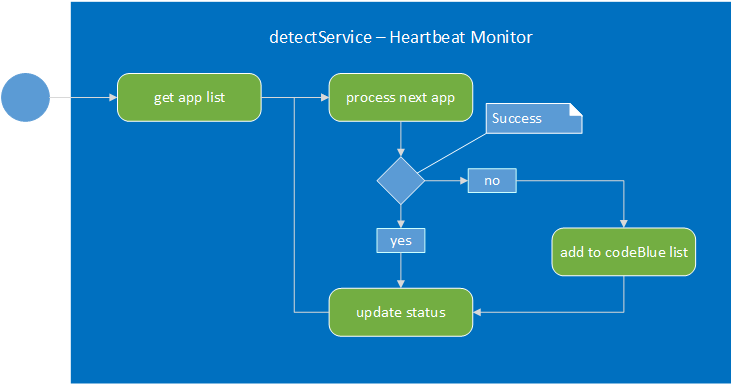
    When the detect() function is called, the remote service is added to a Heartbeat Monitor where it is periodically checked.

    failed()

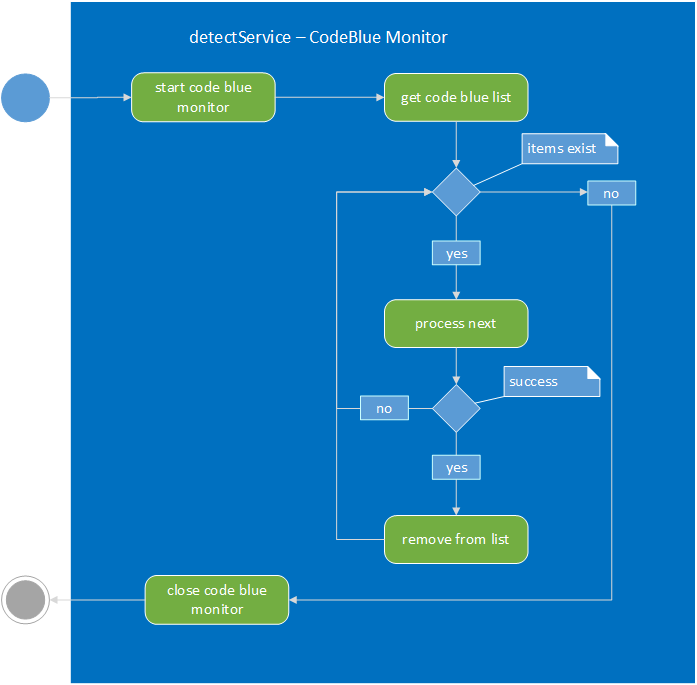
    failed() is a function the cache calls when a remote service attempt fails. This tells the detectService that a service has failed and updates its status in case another call to the remote service is attempted. The remote service is added to a Code Blue List and a process begins checking the remote service for a heart beat.

    Internals

    Here are some of the internals and how they work. You shouldn’t have to deal with them but it might be useful to understand how they are intended to work.

    Heartbeat Monitor

    The Heartbeat Monitor tracks connectivity once a resource is accessed. If a connection attempt fails, then the connection is added to the Code Blue Monitor list and if not already started, the Code Blue Monitor starts.

    Successful heartbeats are logged to the console but not to IndexedDB.

    The log is checked every two hours and any logs more than a week old are removed.

    enter image description here

    Every 2 hours the log is checked and any logs over 1 week old are removed.

    Code Blue Monitor

    The Code Blue Monitor checks resources for connectivity much like the Heartbeat Monitor does but more frequently. The results, pass or fail, are recorded to the console window and IndexedDB.


    Battery level

    If available, the battery level is checked. If the battery level is less than or equal to 30%, all monitors slow down.

    sessionService

    http://robertdunaway.github.io 

    The Mashup is a learning tool that also serves as a bootstrap project for line-of-business applications.

    The sessionService shares session information between modules.

    Purpose

    A great way to share information between modules, in Angular, is via services.

    The sessionService provides, to modules, any information they need about the user, environment, and any other session specific data modules might need.

    userSession

    Exposed by the sessionService, the userSession holds whatever information is returned by the AuthN/AuthR system chosen. The expected properties are not defined but rather inherited by whatever system is providing AuthN/AuthR services.

    var userSession = {};
     
    When this user information is retrieved by the application, the setUserSession function is called.

    The sessionService is not tasked with retrieving this information but only holding it for modules to consume.

    envSession

    Environment information is exposed by the sessionService via envSession.

    Retrieving environment information doesn’t require external access to databases or WebApi(s) so the separation of responsibilities is not too badly abused when the sessionService retrieves environmental information on its own.

    envSession is a good candidate for being modularized by a utlity_ module.

    Some user/environment session properties include:
    • browser: “Chrome 38.0.2125.101”
    • deviceType: “desktop”
    • osName: “Windows”
    • battery level
    • battery status
    • userId: “user name”
    • ADDomain
    • AuthenticationType
    • IsAnonymous
    • IsAuthenticated
    • Groups[]
    • Roles[]
    • Privileges[]
    • ActiveStatus
    • FirstName
    • LastName
    • FullName
    • Email
    • CreatedDateTime
    • CreatedBy
    • UpdatedDateTime
    • UpdatedBy
    More properties can be added as needed.