• Search form is empty!

  • Showing posts with label Resolve. Show all posts
    Showing posts with label Resolve. Show all posts

    http://robertdunaway.github.io

    http://mashupjs.github.io

    The Mashup is a learning tool that also serves as a bootstrap project for line-of-business applications.

    Mashup Applications

    One of the functions of the Mashup is allowing you to build new applications without having to build the plumbing again. Core features and libraries are available to all Mashup applications.


    The apps directory is for your applications. After installing the Mashup you’ll have a couple starter apps as a map for how to create your own.


    Placing your application in the Apps folder and using a few conventions makes integrating apps into the Mashup seamless.

    Routing

    route.config.js


    Route configurations placed in this file are combined by Grunt/Gulp and loaded at run-time.


    This approach makes it possible to drop in or remove applications without having to fiddle with routing. Each app is 100% self-contained and can be moved easily between MashupJS implementations.

    menu.config.js


    Describes the intended menu structure in JSON. The menu structure can be static or you can create a process that dynamically generates it based on user roles/rights.


    This file is concatenated with other menu.config.js files and load at run-time.

    AuthN/AuthR

    An example of a basic authentication method is implemented in the [root]/apps/mashup.


    Each application is responsible for its own security but each application can subscribe to the user session of another application. It’s likely, in companies using AD, only one session is created from which app applications derive authentication and authorization properties.


    Authentication and authorization are performed in the route configuration using “resolve”.

    Example:

    mashupApp.config(['$routeProvider', function ($routeProvider) {
        $routeProvider.otherwise({ redirectTo: '/mashup' });
        $routeProvider
        .when('/mashup/about', {
            templateUrl: 'apps/mashup/about.html',
            controller: 'mashup.AboutController',
            controllerAs: 'vm',
            resolve: {
                loadMyCtrl: ['$ocLazyLoad', function ($ocLazyLoad) {
    // you can lazy load files for an existing module
    return $ocLazyLoad.load({
        name: 'mashupApp',
        files: ['apps/mashup/about.controller.min.js']
    });
                }],
                resolveRoute: ['$route', 'mashupRouterAuth', function ($route, mashupRouterAuth) {
    return mashupRouterAuth.resolveRoute(['Administrator']);
                }],
            }
        })


    The “resolveRoute:” function is executed before the route can be resolved. If the user is not authenticated then they can be re-routed to a login page. If the user is not authorized then they can be routed to a page that says they are not authorized.


    The resolveRoute function is injected with the “mashupRouterAuth” which gives access to the “resolveRoute” function. The “mashup” in “mashupRouteAuth” is referring to the name of the app plush “RouterAuth”. You application, if named “accounting”, could be “accountingRouteAuth”.


    You can deviate and improve upon this basic design.

    Sessions

    Each application can have its own session or share. It’s possible that all your applications use one session except for a customer facing application that uses Identity Server 3. The mashup can easily accommodate multiple sessions.


    There are two different types of session. There is the “sessionService” and an application’s user session.


    The sessionService is for general use by utilities such as the logService. Only a little user information is maintained in the sessionService to let utilities know the user and application that was being used at that moment. When switching to another application within the mashup the user id from that session and its application name are updated within the sessionService.


    The application’s user session is stored in IndexedDB and retrieved by the session name.

    Basic AuthN/AuthR Example:

    (function () {
    
     getAppSession().then(function (data) {
        var appUserSession = data[0];
        var session = _.first(_.where(appUserSession.sessions, { 'appName': 'coreSession' }));
    
        var isAuthenticated = isUserAuthenticated(session);
        var isAuthorized = isUserAuthorized(session, authGroupArray);
    
        if (!isAuthorized) {
            // Just kill the page change completely.
            defer.reject();
        }
    
        if (!isAuthenticated) {
            // HERE YOU CAN SET $location.path('/login') to force authentication.
            $location.path('/mashup/login');
        }
        else {
            session.sessionLastUsed = utility.localMilToUtcMil(new Date().getTime());
        }
    
        coreRouteHelper.logRoute('mashup');
        defer.resolve(true);
    
      });
    
    })();
    
      return defer.promise;
    };
    
    var getAppSession = function () {
      return cacheService.getCache('mashupSessions');
    };
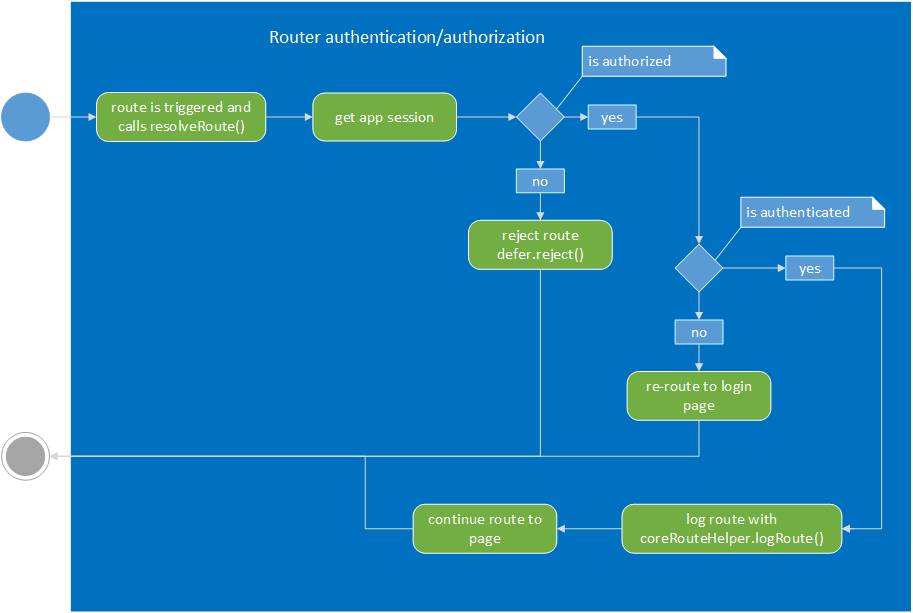


    enter image description here


    JavaScript Loading Options

    Depending on your development and delivery workflow there are multiple approaches to optimizing and building your solution.


    - Use Grunt/Gulp to create one file for each page Lazy load each JS as needed.
    - Use Grunt/Gulp to create one file per application.
    - Use Grunt/Gulp to create one file for the entire mashup and apps.
    - Initial load time versus deep linking.
    - You can optimize the initial load of the first page but when users can deep link into any place in the application the quick initial load is lost. The option I’ve chose is lazy loading components needed for any page via the router. This gives us a fairly quick deep linking load time.
    - These are line-of-business applications that are used repeatedly. Once the application has loaded once the follow up loads should pull scripts from cache.

    apps/mashup

    Welcome Page – just a landing page.

    About Page

    Displays all sessions with one tab per session and the session in the form of JSON. You’re about page will have a more custom display of user session information.


    The About page also displays what is currently cached for fast data retrieval.

    Login Page

    The login page demonstrates a basic way to get and store authentication information as a user session.
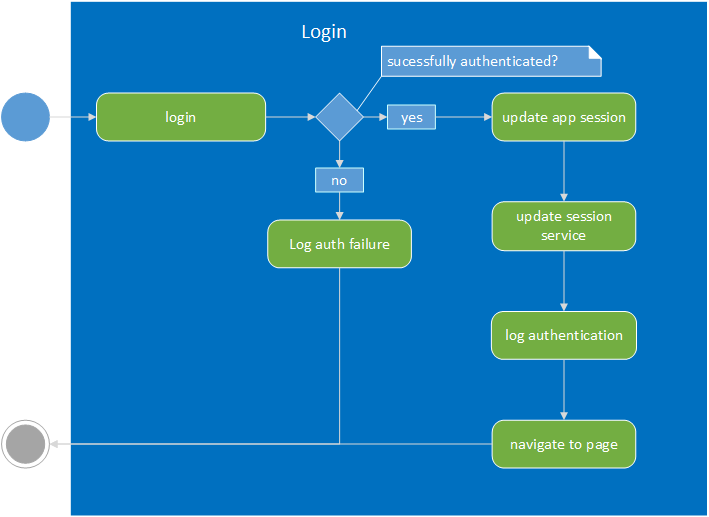

    enter image description here

    http://robertdunaway.github.io

    http://mashupjs.github.io

    The Mashup is a learning tool that also serves as a bootstrap project for line-of-business applications.

    Mashup/Apps

    One of the functions of the Mashup is allowing you to build new applications without having to build the plumbing again. Core features and libraries are available to all Mashup applications.

    The apps directory is for your applications. After installing the Mashup you’ll have a couple starter apps as a map for how to create your own.

    Placing your application in the Apps folder and using a few conventions makes integrating apps into the Mashup seamless.

    Routing

    route.config.js
    Route configurations placed in this file are combined by Grunt/Gulp and loaded at run-time.
    This approach makes it possible to drop in or remove applications without having to fiddle with routing. Each app is 100% self-contained and can be moved easily between MashupJS implementations.
    menu.config.js
    Describes the intended menu structure in JSON. The menu structure can be static or you can create a process that dynamically generates it based on user roles/rights.

    This file is concatenated with other menu.config.js files and load at run-time.

    AuthN/AuthR

    An example of a basic authentication method is implemented in the [root]/apps/mashup.

    Each application is responsible for its own security but each application can subscribe to the user session of another application. It’s likely, in companies using AD, only one session is created from which app applications derive authentication and authorization properties.

    Authentication and authorization are performed in the route configuration using “resolve”.

    Example:

    mashupApp.config(['$routeProvider', function ($routeProvider) {
        $routeProvider.otherwise({ redirectTo: '/mashup' });
        $routeProvider
        .when('/mashup/about', {
            templateUrl: 'apps/mashup/about.html',
            controller: 'mashup.AboutController',
            controllerAs: 'vm',
            resolve: {
                loadMyCtrl: ['$ocLazyLoad', function ($ocLazyLoad) {
    // you can lazy load files for an existing module
    return $ocLazyLoad.load({
        name: 'mashupApp',
        files: ['apps/mashup/about.controller.min.js']
    });
                }],
                resolveRoute: ['$route', 'mashupRouterAuth', function ($route, mashupRouterAuth) {
    return mashupRouterAuth.resolveRoute(['Administrator']);
                }],
            }
        })
     
    The “resolveRoute:” function is executed before the route can be resolved. If the user is not authenticated then they can be re-routed to a login page. If the user is not authorized then they can be routed to a page that says they are not authorized.

    The resolveRoute function is injected with the “mashupRouterAuth” which gives access to the “resolveRoute” function. The “mashup” in “mashupRouteAuth” is referring to the name of the app plush “RouterAuth”. You application, if named “accounting”, could be “accountingRouteAuth”.

    You can deviate and improve upon this basic design.

    Sessions

    Each application can have its own session or share. It’s possible that all your applications use one session except for a customer facing application that uses Identity Server 3. The mashup can easily accommodate multiple sessions.

    There are two different types of session. There is the “sessionService” and an application’s user session.

    The sessionService is for general use by utilities such as the logService. Only a little user information is maintained in the sessionService to let utilities know the user and application that was being used at that moment. When switching to another application within the mashup the user id from that session and its application name are updated within the sessionService.

    The application’s user session is stored in IndexedDB and retrieved by the session name.

    Basic AuthN/AuthR Example:

    (function () {
    
     getAppSession().then(function (data) {
        var appUserSession = data[0];
        var session = _.first(_.where(appUserSession.sessions, { 'appName': 'coreSession' }));
    
        var isAuthenticated = isUserAuthenticated(session);
        var isAuthorized = isUserAuthorized(session, authGroupArray);
    
        if (!isAuthorized) {
            // Just kill the page change completely.
            defer.reject();
        }
    
        if (!isAuthenticated) {
            // HERE YOU CAN SET $location.path('/login') to force authentication.
            $location.path('/mashup/login');
        }
        else {
            session.sessionLastUsed = utility.localMilToUtcMil(new Date().getTime());
        }
    
        coreRouteHelper.logRoute('mashup');
        defer.resolve(true);
      });
    })();
      return defer.promise;
    };
    
    var getAppSession = function () {
      return cacheService.getCache('mashupSessions');
    };
     
     
    enter image description here


    JavaScript Loading Options

    Depending on your development and delivery workflow there are multiple approaches to optimizing and building your solution.
    • Use Grunt/Gulp to create one file for each page Lazy load each JS as needed.
    • Use Grunt/Gulp to create one file per application.
    • Use Grunt/Gulp to create one file for entire mashup and apps.
    • Initial load time versus deep linking.
      • You can optimize the initial load of the first page but when users can deep link into any place in the application the quick initial load is lost. The option I’ve chose is lazy loading components needed for any page via the router. This gives us a fairly quick deep linking load time.
      • These are line-of-business applications that are used repeatedly. Once the application has loaded once the follow up loads should pull scripts from cache.

    apps/mashup

    Welcome Page – just a landing page.

    About Page

    Displays all sessions with one tab per session and the session in the form of JSON. You’re about page will have a more custom display of user session information.

    The About page also displays what is currently cached for fast data retrieval.

    Login Page

    The login page demonstrates a basic way to get and store authentication information as a user session.

    enter image description here

    routeConfig.js


    http://robertdunaway.github.io

    The Mashup is a learning tool that also serves as a bootstrap project for line-of-business applications.

    https://github.com/MashupJS/MashupJS

    The routeConfig.js file holds routing information for the Mashup.

    Multiple files implementation

    There is one routeConfig.js file per application. This offers a little independence to the developer and application if it is deployed as a mobile application.

    Additionally, for large applications, separating route configurations makes it easy to exclude routes the user doesn’t need, reducing the number of routes the system must interrogate between state changes.
    Applications are defined by each directory in the core/apps directory. 
    Examples:
    App1 - root/core/apps/app1
    App2 - root/core/apps/app2
    Mashup - root/core/apps/mashup

    root/config/rootConfig.js

    This is the initial route configuration file that is always loaded. It contains the default route “/” and more importantly the code for starting up the session.

    The loadCompleted() function is run by every route requiring an authenticated user. It gets user information and puts it into the sessionService, then logs the route for instrumentation and analysis.
    The “getUserInfo()” function may vary from application to application but the pattern is in place and works for anyone who wishes to verify authentication before executing a route.

    The “60” in getUserInfo(60) means the user’s information is cached and that cache doesn’t become stale for 60 minutes. If the user information cache is not stale then the cache is used rather than making a call to the authentication server, AuthApiADSP.
    NOTE: AuthApiADSP is the authentication server used by the Mashup but any custom implementation will work.
    The ADSP means the AuthApi uses Active Directory for authentication and Stored Procedures for data access as opposed to oData or EF.

    Lazy Loading

    Typically a SPA application written with Angular will have many files referenced in the Index.html that load when the application starts. To improve this, many files can be concatenated into one and then minified.

    Lazy Loading takes this one step further. Files are still minified and an application may choose to concatenate its own files but the files are never loaded until the first time they are needed and then they are cached for subsequent loads.

    This release of Angular (1.3) does not support lazy loading but I expect it will soon be available with the work Angular 2.0 is doing and much of that will be done in the router and ported back to Angular 1.3.

    How we are implementing lazy loading, until Angular supports it, is via ocLazyLoad.

    mashupApp.config(function ($routeProvider) {
    
        $routeProvider
    
            .when('/mashupExamples/angularExamplesMain', {
                templateUrl: 'apps/mashupExamples/angularExamplesMain/angularExamplesMain.html',
                controller: 'angularExamplesMainController'
                , resolve: {
                    loadMyCtrl: ['$ocLazyLoad', function ($ocLazyLoad) {
                        return $ocLazyLoad.load({
                            name: 'mashupApp',
                            files: ['apps/mashupExamples/angularExamplesMain/angularExamplesMainController.js']
                        });
                    }]
                 , sessionLoad: function ($route, sessionLoad) { return sessionLoad.loadCompleted(); }
                }
            })
    NOTE: Notice the file property is an array. Here you can link to any and all js files your module needs and if it has already been requested, that will be used and the load never occurs.
    Here is the Network tab in Chrome during the first load of a module and the next image is during the second call for the same module.

    First load


    Second load


    NOTE: There is a bug in ocLazyLoad where you must tell it what modules you’ve already loaded. ocLazyLoad 0.3.9 fixes this for everything except Angular Bootstrap which the mashup uses.
    https://github.com/ocombe/ocLazyLoad/issues/71#issuecomment-61446335
    Added to address the ocLazyLoad issue.
    // ----------------------------------------------------------------------------------------------
    // This configures ocLazyLoadProvider and let's it know that some modules have already been
    // loaded.  Without this the Menu dialog would not work because some directive was loaded twice.
    // https://github.com/ocombe/ocLazyLoad/issues/71
    // ----------------------------------------------------------------------------------------------
    angular.module('mashupApp').config(['$ocLazyLoadProvider', function ($ocLazyLoadProvider) {
    
        $ocLazyLoadProvider.config({
            loadedModules: ['ngRoute', 'ui.bootstrap', 'ngSanitize', 'oc.lazyLoad']
        });
    
    }]);
    

    Resolve

    The resolve function is very powerful and allows you to perform functions required before a route is executed.

    The Mashup makes use of Resolve to verify the user has been authenticated, after which the user session is created.

    Here is the configuration for the /about route.

        $routeProvider
            .when('/about', {
                templateUrl: 'apps/mashup/about/about.html',
                controller: 'aboutController',
                resolve: {
                    loadMyCtrl: ['$ocLazyLoad', function ($ocLazyLoad) {
                        // you can lazy load files for an existing module
                        return $ocLazyLoad.load({
                            name: 'mashupApp',
                            files: ['apps/mashup/about/aboutController.js', 'apps/mashup/~appServices/dataService.js']
                        });
                    }]
                    , sessionLoad: function ($route, sessionLoad) { return sessionLoad.loadCompleted(); }
                }
    
            })
     
    When the /about route is triggered, the templateUrl is set as well as the controller. Then you’ll have a resolve. Everything in the resolve must be complete before the route can execute. In this case we have two functions. First the loadMyCtrl function must complete and then the sessionLoad: function. The session load calls sessionLoad.loadCompleted() function.

    Here is the factory implementation. You’ll see that every attempt is made to short-circuit the load event if it can be determined the user has been detected recently. Slowness in this function will be perceived by the user.
    
    mashupApp.factory('sessionLoad', function ($log, $q, $timeout, $location, $interval, sessionService, mashupDataService, utility) {
    
        var userInfoCacheDuration = 1;
        var userInfoLastChecked = 0;
    
        var logRouteInstrumentation = function () {
            // -------------------------------------------------------------------
            // Instrumenting the application so we can track what pages get used.
            // -------------------------------------------------------------------
            var logObject = utility.getLogObject("Instr", "MashupCoreUI", "sessionLoad", "loadComplete", "UI-Routing", sessionService);
            // Additional or custom properties for logging.
            logObject.absUrl = $location.absUrl();
            logObject.url = $location.url();
            $log.log("UI-Routing to [ " + $location.url() + " ]", logObject);
            // -------------------------------------------------------------------
            // -------------------------------------------------------------------
        };
    
        var loadCompleted = function () {
    
            var defer = $q.defer();
    
            (function () {
                // This controller only loads once when this site with any route is reloaded.
                // For now this is where I'll put code that needs to load once.
    
                // Attempt to shortcircuit call to getUserInfo if it has been called within the cache duration.
                var duration = (new Date().getTime() - userInfoLastChecked) / (1000 * 60); // 1000 is one second and 60 is one minute.
                if (duration > userInfoCacheDuration) {
    
                    mashupDataService.getUserInfo(60).then(function (data) {
    
                        if (data === null || data === undefined || data === '' || data.length === 0) {
    
                            // TODO: add this to a log that is transmitted immediately  will need to implement the log transmission module first.
                            $log.info('The getUserInfo returned an empty array.  Just thought you should know.');
    
                        } else {
                            // saving session information for the rest of the mashup to use.
                            userInfoLastChecked = new Date().getTime();
                            sessionService.setUserSession(data[0]);
                        }
    
                        logRouteInstrumentation();
    
                        // TODO: Might be a good place to put some AuthR code.  Anything we do here needs to also be done at the server.
                        // The client side is to easily manipulated.
                        defer.resolve(true);
                    }),
                        function () {
                            // if userInfoLastChecked is not 0 then the user has been authenticated at some point.
                            // if an error occurs then we should not prevent the user from navigating to the next page.
                            if (userInfoLastChecked) {
                                defer.resolve(true);
                            }
                        };
                } else {
                    // short circuit because we are within the duration threshold
                    logRouteInstrumentation();
                    defer.resolve(true);
                }
            })();
    
            return defer.promise;
        };
    
        return {
    
            // Good jsfiddle on how this works. http://jsfiddle.net/JYvsZ/
    
            loadCompleted: loadCompleted
        };
    });
